
The Problem You Already Know
You need RDP access to a SCADA workstation. Maybe it is an HMI at a remote pump station. Maybe it is a Wonderware InTouch server at a wastewater treatment plant. Maybe a Siemens PCS 7 engineering station in a chemical facility that a vendor needs to reach for quarterly maintenance.
And you know what happens next. Someone asks IT to open an inbound port. IT pushes back. A compromise is reached: a VPN concentrator goes in the IDMZ, port 443 opens inbound, and an RDP jump server gets provisioned. The vendor connects through the VPN, lands on the jump server, and RDPs into the SCADA workstation from there.
It works. It also creates an internet-facing attack surface that every threat intelligence report in 2025 tells you is the single most exploited vector in OT environments. Dragos reported that ransomware affiliates consistently used valid credentials to authenticate into VPN portals, then leveraged RDP, SMB, and WinRM to move laterally toward SCADA and HMI workloads. Claroty found that 82% of verified OT intrusions in 2025 used internet-facing remote access tools – VNC, RDP via VPN, TeamViewer – as the initial entry point. The tools were freely available. The attacks were not sophisticated. The ports were open.
In August 2025, GreyNoise data showed approximately 2,000 malicious IPs simultaneously probing Microsoft RD Web Access and RDP Web Client endpoints. By October 2025, researchers identified a botnet of over 100,000 IPs conducting login enumeration against RDP services. And CVE-2025-48817 – a critical RDP client vulnerability disclosed in July 2025 – demonstrated that even the client side of RDP is now an attack vector, not just the server.
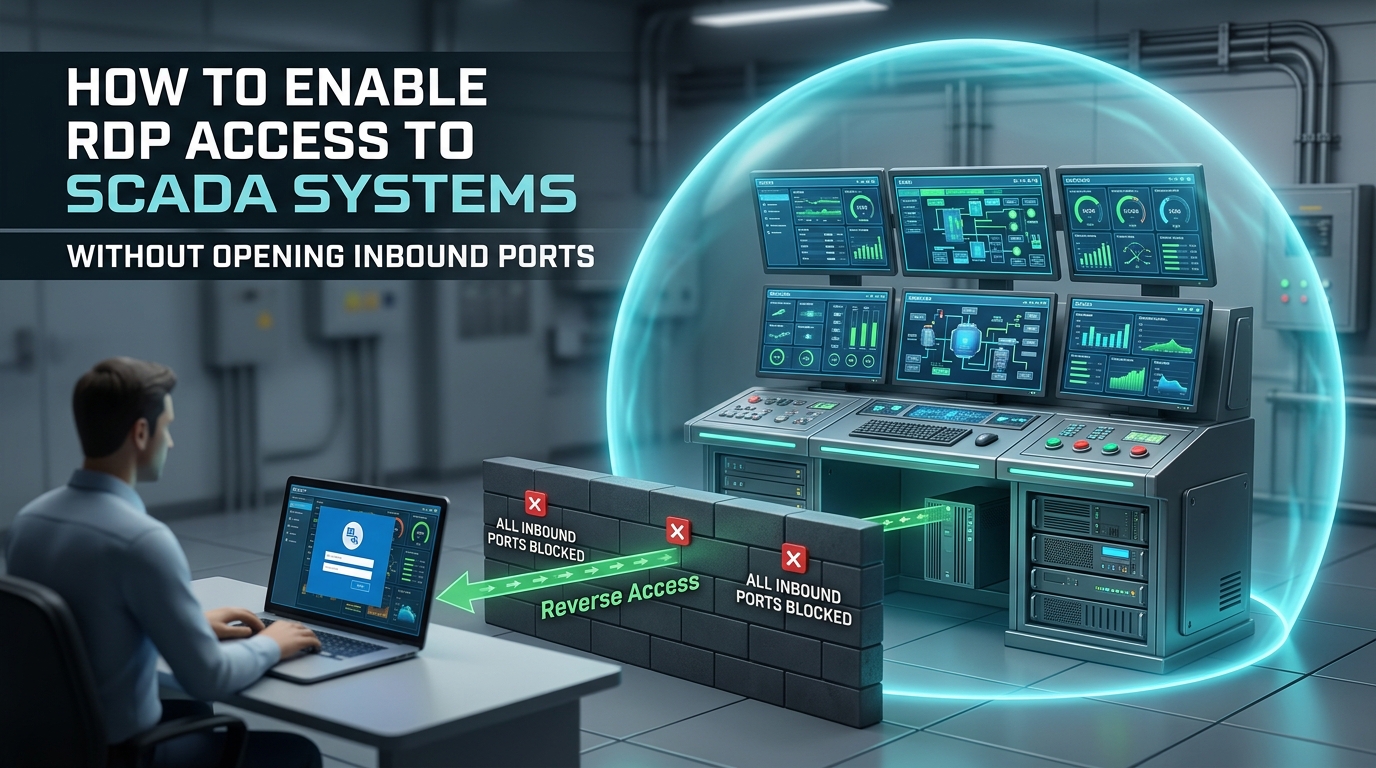
This article provides a step-by-step configuration guide for enabling full RDP access to SCADA systems without opening any inbound firewall ports, without deploying a VPN, and without exposing any service to the internet. The architecture uses reverse-access technology – where the OT-side component initiates all connections outbound – keeping the firewall in permanent deny-all for inbound traffic.
What Reverse-Access RDP Looks Like
Traditional Architecture (Inbound)
[Remote User] → Internet → [Firewall: Port 443 OPEN] → [VPN in IDMZ] → [Jump Server] → [RDP to SCADA]
The firewall must open at least one inbound port. The VPN concentrator is internet-facing and discoverable. The jump server has network-level access to the SCADA zone. Every component in this chain is a target.
Reverse-Access Architecture (Outbound-Only)
[SCADA Zone] → [Access Controller: outbound HTTPS 443] → [Access Gateway in DMZ] ← [Remote User authenticates here]
The Access Controller inside the OT network initiates an outbound TLS connection to the Access Gateway in the DMZ. The remote user authenticates at the Gateway – identity, MFA, device posture – and the Gateway routes the authorized RDP session through the existing outbound tunnel to the specific SCADA workstation. The firewall never opens an inbound port. The SCADA network has no public IP, no listening service, and no discoverable attack surface.
What Changes for the OT Engineer
From the user’s perspective, almost nothing. You open a browser or lightweight client, authenticate with your credentials + MFA, and an RDP session appears to the specific SCADA workstation you are authorized to access. The session looks and feels like standard RDP. You can interact with the HMI, run diagnostics, access process data.
What changes is everything behind the session: the SCADA workstation is invisible to the internet, the session is application-specific (not network-level), and the firewall remains in deny-all.
Why RDP Alone Is Not Enough – and What a Multi-Layer Architecture Solves
Securing RDP access to SCADA is one piece of a larger problem. In most OT environments, the IT/OT boundary carries three types of traffic simultaneously: interactive application sessions (RDP, SSH, HTTP), file transfers (firmware updates, configuration backups, historian exports), and file sharing via SMB between engineering workstations and shared storage. Solving for RDP without addressing the other two leaves gaps that attackers exploit – a firmware file infected with malware, or an uncontrolled SMB share bridging IT and OT, can compromise the environment even if the RDP path itself is secure.
truePass Gravity addresses this by combining all three functions in a single platform built on reverse-access architecture. Layer 1 (Reverse Access) provides the zero-inbound-port foundation that this article describes – outbound-only connections, permanent deny-all firewall, invisible SCADA infrastructure. Layer 2 (SMB Proxy) brokers file sharing between environments with Kerberos/NTLM authentication, SMB Signing, end-to-end encryption, and integrated CDR scanning. Layer 3 (Zero Trust Application Access) delivers the per-workstation RDP, SSH, and HTTP access with MFA, session recording, and granular redirection controls detailed in the configuration steps below. The three layers share a single policy engine, a single audit trail, and a single management console – eliminating the “patch on patch” problem where separate tools for files, applications, and segmentation create gaps between them.
Quick Reference: Four Ways to Get RDP to SCADA – and Their Tradeoffs
Before diving into configuration, here is a direct comparison of the four approaches OT teams typically evaluate. This is written for the engineer making the architecture decision.
Approach | How It Works | Inbound Ports | Lateral Movement Risk | Session Recording | Vendor Access Control | Practical Reality |
Direct RDP | Port 3389 open to internet | 1 (3389) | Total – full network | None | None | Suicidal. Never do this. |
VPN + Jump Server | VPN concentrator in IDMZ, RDP from jump server | 1+ (443/1194) | High – jump server has L3 network access | Manual (if configured) | Shared VPN credentials, no time limits | Standard today. Exploited constantly. |
Cloud ZTNA | Cloud broker mediates access via connector | 0 on OT side | Low – application-level | Vendor-dependent | Per-user policies possible | Good, but all traffic routes through vendor cloud |
On-prem Reverse Access | OT connector initiates outbound to local gateway | 0 – permanent deny-all | None – per-workstation isolation | Built-in (video + keystroke) | Named accounts, time-bounded, approval-required | Strongest for classified/regulated OT |
For OT engineers in regulated environments (energy, water, defense, government) where data cannot traverse commercial cloud infrastructure, on-premises reverse access is the architecture that satisfies both the operational need (RDP to SCADA) and the security requirement (zero inbound ports, full session audit, no cloud dependency).
Step-by-Step Configuration
Step 1: Deploy the Access Controller Inside the OT Network
The Access Controller is a lightweight component deployed in the SCADA zone or the IDMZ. It does not accept inbound connections. It initiates an outbound HTTPS connection (port 443, TLS 1.2/1.3) to the Access Gateway.
Placement options:
Placement | When to Use | Security Posture |
Inside SCADA zone (Level 3) | Maximum proximity to target workstations | Strongest – no inbound traffic reaches Level 3 |
In the IDMZ (Level 3.5) | When SCADA zone policy prohibits any new components | Strong – outbound from IDMZ, deny-all inbound from IT |
In a dedicated access segment | When multiple OT zones need access | Strong – isolated segment with outbound-only connectivity |
Requirements:
- Windows Server or Linux VM (minimal resources – 2 vCPU, 4 GB RAM typical)
- Outbound HTTPS connectivity to the Access Gateway (port 443 only)
- No inbound firewall rules required
- Network connectivity to target SCADA workstations on RDP port 3389 (internal only – never exposed externally)
Step 2: Deploy the Access Gateway in the DMZ
The Access Gateway sits in the DMZ or at a cloud edge. It is the only externally reachable component – and it only serves as the authentication and policy enforcement point. It does not provide direct access to any OT resource.
Configuration:
- Public-facing HTTPS endpoint for user authentication
- Connection to the organization’s identity provider (Active Directory, Okta, Entra ID)
- MFA enforcement (FIDO2, authenticator app, or hardware token)
- Policy engine defining per-user, per-application access rules
- PKI certificates for mutual TLS between Gateway and Controller
Step 3: Define Per-Workstation Access Policies
This is where reverse-access fundamentally differs from VPN. Instead of granting network access to the SCADA zone, you define application-level policies for each SCADA workstation:
Example policy structure:
Policy Element | Example Value |
User / Group | OT-Engineers-Shift-A (from AD) |
Target Application | RDP to SCADA-HMI-01 (192.168.10.50:3389) |
Authentication | AD credential + FIDO2 key |
Device Posture | Windows 10/11, EDR active, disk encrypted, OS patched within 30 days |
Time Window | Monday–Friday, 06:00–22:00 |
Session Duration | Maximum 8 hours, auto-terminate on idle > 30 min |
Session Recording | Enabled (video + keystroke) |
Clipboard Redirection | Disabled (no copy/paste between local and remote) |
Drive Redirection | Disabled (no file transfer via RDP mapped drives) |
Printer Redirection | Disabled |
Vendor maintenance policy (different from employee policy):
Policy Element | Vendor Value |
User | Vendor-Siemens-Tech-001 (named account, not shared) |
Target | RDP to PCS7-ENG-WS-03 only |
Authentication | AD credential + SMS OTP (vendor cannot use FIDO2) |
Time Window | Pre-approved 4-hour maintenance window only |
Session Duration | 4 hours, non-renewable without re-approval |
Session Recording | Mandatory (full video + keystroke + screen capture) |
Clipboard / Drive / Printer | All disabled |
Approval Workflow | Requires OT supervisor approval before session activates |
Step 4: Configure RDP Hardening on the SCADA Workstation
The reverse-access architecture secures the connection path, but the SCADA workstation itself must also be hardened for RDP:
- Enable Network Level Authentication (NLA): Requires authentication before the RDP session is established – prevents unauthenticated resource consumption.
- Restrict RDP access to specific accounts: Only the AD groups mapped in the access policy should have RDP login rights on the workstation.
- Disable RDP on the external interface: RDP should only listen on the internal network interface – it is never exposed to any network outside the SCADA zone.
- Set session limits: Maximum session count, idle timeout, and disconnected session timeout should match the access policy.
- Enforce TLS for RDP transport: Configure the workstation to require TLS 1.2+ for all RDP connections – no legacy SSL/TLS fallback.
- Disable unused RDP features: Clipboard redirection, drive mapping, printer redirection, audio redirection, and COM port redirection should all be disabled at the workstation level as defense-in-depth (in addition to the access policy controls).
Step 5: Set the Firewall to Deny-All Inbound
Once the reverse-access architecture is operational:
- Remove all inbound firewall rules to the SCADA zone that were used for VPN, RDP, or jump server access
- Set the default inbound policy to deny-all with no exceptions
- Verify: only outbound HTTPS (443) from the Access Controller to the Access Gateway remains
- Run an external scan (Shodan, Censys, Nmap) against the facility’s IP range – verify zero results
This is the most important step. If the firewall still has inbound rules “just in case,” the entire architecture loses its security property.
Step 6: Validate the Complete Path
Run through the full access sequence to verify:
- [ ] User authenticates at the Access Gateway with credentials + MFA
- [ ] Device posture is verified (OS, EDR, encryption, patch level)
- [ ] Policy engine evaluates the request against per-workstation rules
- [ ] RDP session is established through the outbound tunnel to the specific SCADA workstation
- [ ] Session recording captures the full session (video + keystroke)
- [ ] Session terminates automatically at the configured time limit
- [ ] Vendor sessions require approval workflow before activation
- [ ] External scan confirms zero discoverable services on the facility’s IP range
- [ ] Audit trail shows complete record: who, when, which workstation, what actions, session duration
What You Gain vs. What You Lose
Dimension | VPN + Jump Server | Reverse-Access RDP |
Inbound ports required | 1+ (VPN port 443 or 1194) | Zero |
Internet-facing services | VPN concentrator + jump server | None – invisible |
Network access after auth | Full SCADA zone (Layer 3) | One specific workstation only |
Lateral movement risk | High – any device on L3 is reachable | None – session is application-isolated |
Credential brute-force exposure | VPN login is internet-facing | Auth happens at Gateway; SCADA is invisible |
Vendor access control | Same VPN tunnel as employees | Separate policy, time-bounded, recorded, approval-required |
Session recording | Typically not available | Built-in: video, keystroke, screen capture |
Clipboard/drive control | Depends on jump server config | Policy-enforced at the access layer |
Compliance audit trail | Partial (VPN logs + RDP logs, different systems) | Unified: one audit trail per session with full context |
Patch urgency for VPN | Critical – internet-facing VPN CVEs are actively exploited | N/A – no VPN in the architecture |
What you lose | Nothing functional | The ability to scan the facility from the internet (this is the point) |
Real Scenario: Water Treatment Plant
Facility: Municipal water treatment plant with 3 SCADA workstations (Wonderware InTouch), 12 PLCs (Allen-Bradley ControlLogix), and 2 historian servers.
Before: Cisco AnyConnect VPN with TCP 443 open inbound. One jump server in the IDMZ with RDP access to all 3 SCADA workstations. 4 vendor accounts sharing 2 VPN credentials. No session recording. VPN firmware 11 months out of date. Shodan scan showed 2 discoverable services.
After:
- Access Controller deployed in IDMZ, outbound HTTPS to Access Gateway
- 3 per-workstation policies: each OT engineer authorized for their specific SCADA workstation only
- 4 individual vendor accounts with named credentials, MFA, and 4-hour time-bounded sessions
- All sessions recorded with full video and keystroke capture
- Clipboard, drive, and printer redirection disabled for all vendor sessions
- VPN concentrator decommissioned. Jump server decommissioned.
- Firewall set to deny-all inbound – no exceptions
- Shodan scan: zero results
Operational impact: OT engineers report that the RDP experience is identical. Connection time is comparable (the outbound tunnel adds single-digit milliseconds of latency). The difference is invisible to the user – but the facility’s internet-facing attack surface is eliminated.
Handling Common OT Engineer Concerns
“I need low latency for real-time SCADA interaction”
The outbound TLS tunnel adds 2–8ms of latency depending on network path. For HMI interaction, historian queries, and diagnostic operations, this is imperceptible. For real-time control loops – those operate locally on the PLC and are not affected by remote access architecture at all. The remote session is for monitoring and configuration, not for closed-loop control.
“Our SCADA vendor says they need direct RDP”
They need RDP to the workstation. They do not need an inbound port on your firewall. The reverse-access architecture delivers a standard RDP session to the vendor – from their perspective, it looks and behaves exactly like connecting through a VPN. The difference is that the connection is brokered through an outbound tunnel instead of an inbound port. The vendor’s RDP client works normally.
“We need to transfer files to the SCADA workstation during maintenance”
Disable RDP drive redirection (it is a lateral movement vector). Instead, use a secure data exchange layer that scans files (AV + CDR) before releasing them to the SCADA zone. This separates the file transfer security problem from the application access security problem – each has its own controls, its own scanning, and its own audit trail.
“What if the outbound connection drops during a critical maintenance window?”
The session terminates. The SCADA workstation returns to its normal operating state – it does not depend on the remote session for process control. The OT engineer re-authenticates and reconnects. The fail-closed design means that a connectivity disruption cannot create an opening in the firewall or leave a session in an uncontrolled state.
“Our compliance auditor wants to see who accessed which SCADA workstation and when”
The unified audit trail records every session with: user identity (named account, not shared), authentication method and device posture at time of access, target workstation IP and hostname, session start/end time and duration, full video recording with keystroke capture, and the specific policy that authorized the session. This is significantly more complete than the split VPN log + Windows Event Log + jump server log that most auditors currently work with.
IEC 62443 Alignment
IEC 62443 Requirement | How This Architecture Addresses It |
FR1 – Identification & Authentication | Per-session MFA with device posture verification before any RDP connection |
FR2 – Use Control | Per-workstation access policies with least-privilege enforcement – each user accesses only their authorized SCADA workstation |
FR3 – System Integrity | Session recording captures all actions; clipboard/drive redirection disabled prevents unauthorized file introduction |
FR4 – Data Confidentiality | TLS 1.2/1.3 encryption on the outbound tunnel; RDP transport encrypted end-to-end |
FR5 – Restricted Data Flow | Outbound-only connection; no inbound data flow to SCADA zone; microsegmented access paths |
FR6 – Timely Response | Unified audit trail with per-session records; SIEM integration via Syslog |
FR7 – Resource Availability | No inbound attack surface = no DDoS vector; zero discoverable services |
Deployment Checklist
Pre-Deployment
- [ ] Inventory every SCADA workstation that requires remote RDP access
- [ ] Document every user (internal + vendor) who needs RDP access and to which specific workstation
- [ ] Record current firewall inbound rules for VPN/RDP/jump server access
- [ ] Verify outbound HTTPS (443) is permitted from the IDMZ or SCADA zone to the DMZ
Deployment
- [ ] Deploy Access Controller (IDMZ or SCADA zone)
- [ ] Deploy Access Gateway (DMZ)
- [ ] Establish outbound TLS tunnel between Controller and Gateway
- [ ] Connect Gateway to Active Directory / identity provider
- [ ] Configure MFA (FIDO2 or authenticator app)
- [ ] Create per-workstation access policies for each user/group
- [ ] Create time-bounded vendor policies with approval workflows
- [ ] Enable session recording for all sessions
- [ ] Disable clipboard, drive, and printer redirection in policies
- [ ] Harden RDP on each SCADA workstation (NLA, TLS, session limits)
Cutover
- [ ] Test full access path: auth → policy → RDP session → recording → termination
- [ ] Test vendor workflow: approval → auth → time-bounded session → auto-expiration
- [ ] Remove VPN inbound firewall rules
- [ ] Remove jump server inbound firewall rules
- [ ] Set firewall default to deny-all inbound – no exceptions
- [ ] Decommission VPN concentrator and jump server
Validation
- [ ] External scan (Shodan, Censys, Nmap) – verify zero results
- [ ] Penetration test targeting SCADA remote access paths
- [ ] Audit trail review: verify completeness of session records
- [ ] Compliance documentation: IEC 62443 FR mapping, session recording samples, firewall rule export
Conclusion
You need RDP to SCADA. Your firewall needs to stay closed. These are not competing requirements – they are both achievable with a reverse-access architecture that inverts the connection flow so the OT network initiates all communication outbound.
The RDP session is identical from the user’s perspective. The vendor’s experience is unchanged. The SCADA workstation functions normally. What disappears is the internet-facing attack surface – the VPN concentrator, the jump server, the inbound port, and the entire category of attacks that depends on their existence.
Eighty-two percent of OT intrusions in 2025 used internet-facing remote access as the entry point. Closing the inbound port closes that entry point. The RDP session continues. The attacks do not.